Format
Info
Info

|
|
|
|
|
|
|
|
|
|



|
Here is some general information regarding how to load a Patchman Music Pro Patches soundbank via MIDI using a computer...
Some synths and samplers are blessed with built-in disk drive or a memory card slot which makes it very easy to load new sounds directly without the need for a computer. But for those synths that do NOT have a built-in disk drive, soundbanks are generally loaded in via a MIDI cable by means of a one-time bulk MIDI dump from a computer with a MIDI interface attached to it. This page contains some excellent information to help you understand the process of loading a soundbank via MIDI using a PC or Mac computer.
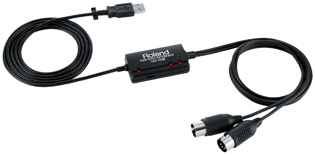 First, you will need to connect the synth to the computer. The easiest and cheapest way to connect to most modern
PCs and Macs is simply by way of an inexpensive USB to MIDI adaptor connected to the
computer.
A good one can cost as little as $40. Please note that there are many USB to MIDI interfaces on the market and there are many that do not work correctly for this purpose. So we strongly recommend the Roland UM-ONE MK2 USB MIDI Interface available in the USA from Patchman Music. These are inexpensive and they have proven to work very well for our customers with all types of sysex transfers.
First, you will need to connect the synth to the computer. The easiest and cheapest way to connect to most modern
PCs and Macs is simply by way of an inexpensive USB to MIDI adaptor connected to the
computer.
A good one can cost as little as $40. Please note that there are many USB to MIDI interfaces on the market and there are many that do not work correctly for this purpose. So we strongly recommend the Roland UM-ONE MK2 USB MIDI Interface available in the USA from Patchman Music. These are inexpensive and they have proven to work very well for our customers with all types of sysex transfers.
DO NOT use one of those cheap $5 interfaces- they do not work with this type of data. Stay away from them. Also we suggest AVOIDING the E-MU 1x1 USB MIDI interface, the Hosa USM-422 Tracklink USB to MIDI interface, and the Miditech Midilink USB Interface- customers have told us they do not work for this purpose.
Firewire interfaces often have MIDI ports on them as well but they are much more expensive.
Once you get the interface make sure you download and install the latest drivers for the interface from the interface manufacturer's website (the drivers that ship with the interface are likely NOT the latest) and then reboot your computer.
Over the years folks have also connected MIDI synths via a MIDI to Gameport adapter cable, a MIDI to soundcard adapter, via a parallel port to MIDI cable, or even directly to the serial port on your computer if the synth had a serial connector on it (Yamaha VL70-m, Roland JV-1010, Korg 05R/W, etc). But these methods are more or less antiquated now.
Patchman Music soundbanks are generally shipped in the form of Midifile (.MID) or Sysex (.SYX) files and sometimes both for your convenience. Midifiles can generally be loaded into a MIDI sequencer such as Logic, Sonar, Cubase, Performer, Pro Tools, Power Tracks Pro, Cakewalk, Vision, etc. or a Midifile player and then transmitted via the MIDI OUT from the computer into the MIDI input of the receiving synth. Sysex files (and Midifiles) can be loaded and transmitted using various free sysex utilities (such as MIDI-OX for the PC and SysEx Librarian for the Mac) and then transmitted to your synth via the MIDI OUT cable from the computer.
We recommend using the Sysex version file and a free Sysex utility as described below.
Click here for a list of freeware and shareware SysEx Utilities and Midifile Players for PC and Mac.
Matt
Patchman Music
|
|
First, set up your synth so that it is ready to receive a bulk dump. These instructions are different for each synth so please refer to the text file or printout that came with the Patchman Music soundbank. Set up the synth now before proceeding. Connect a MIDI cable from the MIDI OUT from your PC to the MIDI IN on your synth. Be sure you have installed the proper driver and the latest driver for your MIDI interface (these are available from the maker of the interface). Install MidiOx. Run Midi Ox. Under the "Options" menu, select "MIDI Devices...". Look in the "MIDI Outputs:" box and select the appropriate MIDI OUT device (this tells MidiOx where to direct the MIDI data). If you do not see an entry for your MIDI interface, then you probably need to reinstall or update the appropriate drivers for your particular MIDI interface. Click "OK" to close the window. Click on the "View" menu and select "SysEx...". In the new window, click on the "File" menu and select "Send Sysex File...". Now locate the Patchman Music soundbank file that ends in ".syx". Highlight it then click on "Open". The data will automatically begin sending to the synth. Wait for the progress bar to complete and the new sounds should be in the appropriate soundbank in your synth. If you need to send a Standard Midifile (.MID) instead of a sysex file: First set the proper MIDI output port as described above. Then look under the ACTIONS menu and select "Play MIDI...". In the new small window click on the folder icon and select the Midifile (.MID) file. Then click on the play button to start sending the Midifile to the synth. If the soundbank is not getting transferred, try the other MIDI cable coming from your MIDI Interface. Sometimes these cables are marked confusingly.
|
 Using MIDI-OX on a PC...
|
|
For OS X Macs: Here are step by step instructions on how to load the soundbank into your synth with SysEx Librarian... First, download and install the Sysex Librarian utility onto your OSX Mac. Double click on the Sysex Librarian icon to run it. Click on the "Add..." button in the lower left hand corner of the window and navigate to the .syx soundbank file. If you don't see it then you may still need to "unStuff" or "unzip" the file you were sent. Double click on the .syx file (or .mid file if appropriate) to load the file into SysEx Librarian. Next, connect a single MIDI cable from the MIDI OUT on your Mac's MIDI interface to the MIDI IN on the receiving synth. Do not connect additional MIDI cables at this time. Be sure you have installed the latest version of the proper drivers for your MIDI interface (these are available from the maker of the interface). Select the proper MIDI OUT port in the "Destination" drop down menu at the top of the window. Turn on the receiving synth and proceed to prepare the synth as specified in the text file or printed documentation you were sent with the Patchman Music soundbank. These instructions are different for each synth. (The EWI4000s needs no preparation other than it be set to MIDI channel 1.) Next, make sure the proper .syx or .mid file is highlighted in the SysEx Librarian window then click on the "Play" button located in the upper left hand corner of the window to begin sending the data to the synth. Allow enough time for the entire bank to transfer as specified in the documentation (usually less than a minute or so). The new sounds should now be in the appropriate soundbank in your synth. If the soundbank is not getting transferred, try the other MIDI cable coming from your MIDI Interface. Sometimes these cables are marked confusingly.
|
 Using SysEx Librarian on a OSX
Mac...
Using SysEx Librarian on a OSX
Mac... 
|
|
For Mac OS 7 through 9 users with OMS installed, we recommend SysEx Universal Midi Librarian. If you do not have OMS installed and do not wish to install it, then please see the box below. If you are using a newer Mac OS X machine, please see the Mac OS X box above. Click here for a list of additional SysEx Utilities and Midifile Players. For OS 7 through 9 Macs with OMS already installed: Here are step by step instructions on how to load the soundbank into your synth with the SysEx Midi Librarian Utility... First, download, decompress, and install Sysex Universal Midi Librarian on your OS 7 through 9 Mac. The final version of OMS 2.3.8 is available here. If you don't have OMS installed you will need to get that worked out first according to Opcode's instructions. Double click on the Sysex Universal Midi Librarian icon to run it. Go to the File Menu and select "Open Any...". Navigate to the .syx soundbank file. If you don't see it then you may still need to "unStuff" or "unzip" the file you were sent. Double click on the .syx file (or .mid file if appropriate) to load the file into Sysex Universal Midi Librarian. Next, connect a single MIDI cable from the MIDI OUT on your Mac's MIDI interface to the MIDI IN on the receiving synth. Do not connect additional MIDI cables at this time. Be sure you have installed the latest version of the proper drivers for your MIDI interface (these are available from the maker of the interface). Turn on the receiving synth and proceed to prepare the synth as specified in the text file or printed documentation you were sent with the Patchman Music soundbank. These instructions are different for each synth. (The EWI4000s needs no preparation.) Next, go to the Options menu and choose "Select Output Device...". and select the proper MIDI OUT port (the one that your synth is connected to). Next, make sure the proper .syx or .mid file is highlighted in the Sysex Universal Midi Librarian window then click on the "Transmit" button to begin sending the data to the synth. Allow enough time for the entire bank to transfer as specified in the documentation (usually less than a minute or so). The new sounds should now be in the appropriate soundbank in your synth. If the soundbank is not getting transferred, try the other MIDI cable coming from your MIDI Interface. Sometimes these cables are marked confusingly.
|
 Using SysEx Universal Midi Librarian
|
|
For Mac OS 7 through 9 users WITHOUT OMS installed, we recommend Bulk SysEx Utility. The Bulk Sysex Utility application only runs on older Macs. If you have a newer Mac please refer to one of the other boxes on this page. The Bulk Sysex Utility application will work with most older Macintosh MIDI interfaces directly via the Mac's serial ports without the need for OMS or FreeMIDI. If you have OMS installed, then please see the box above. If you are using a newer Mac OS X machine, please see the box above. Click here for a list of additional SysEx Utilities and Midifile Players. For OS 7 through 9 Macs WITHOUT OMS installed: Here are step by step instructions on how to load the soundbank into your synth with Bulk SysEx Utility... First, download and decompress the Bulk SysEx Utility onto your OS 7 though 9 Mac. Next, connect a single MIDI cable from the MIDI OUT on your Mac's MIDI interface to the MIDI IN on the receiving synth. Do not connect additional MIDI cables at this time. If needed, be sure you have installed the latest version of the proper drivers for your MIDI interface (these are available from the maker of the interface). Turn on the receiving synth and proceed to prepare the synth as specified in the text file or printed documentation you were sent with the Patchman Music soundbank. These instructions are different for each synth. (The EWI4000s needs no preparation.) Double click on the Bulk SysEx Utility icon to run it then click on the "Continue" button. Under the MIDI menu, select the appropriate "Port" and "Clock" settings. Select "Bulk sysex" from the MIDI menu. Click on the "Open" button. Navigate to the .syx soundbank file. If you don't see it then you may still need to "unStuff" or "unzip" the file you were sent. Turn on "Slow Transmit" by clicking on the "Slow Transmit" checkbox. Push the "Transmit" button. Allow enough time for the entire bank to transfer as specified in the documentation (usually less than a minute or so). The new sounds should now be in the appropriate soundbank in your synth. If the soundbank is not getting transferred, try the other MIDI cable coming from your MIDI Interface. Sometimes these cables are marked confusingly.
|
|
|
The following is a brief explanation of some of the formats in which our soundbanks may be available. Please note that not all formats are available for all synths. Please check the "Format" section in the soundbank description for a list of available formats for a particular soundbank. Most soundbanks include detailed loading instructions. Additional formats may be available. Call for details.
Not all formats are available for
all synths...
 SysEx
(.SYX) File
SysEx
(.SYX) File
The SysEx (.SYX) file format is a widely used, standard format for transferring soundbank files. SYX files can be used with a variety of downloadable freeware and shareware utilities (see above for details) as well as many sequencers such as Logic, Sonar, Cubase, Digital Performer, Vision, Cakewalk, etc. Click here for a listing of some SysEx Utilities for PC and Mac.
Standard
MIDIfile (.MID)
The Standard MIDIfile format is available for Mac and PC compatible computers. Atari ST users should use the PC format. MIDIfiles can be loaded into most of the better MIDI sequencers capable of importing a Standard MIDIfile with sysex embedded within it such as Cakewalk, Sonar, Digital Performer, Cubase, Logic, PowerTracks Pro, Vision, etc. The file is then played which transmits the soundbank data via the MIDI OUT from your computer to the synth. (Some of the budget sequencers do not handle MIDIfiles with sysex data very well if at all.) Windows Media Player works with some Midifiles containing sysex data but not others so we don't recommend using it. The sequencers we listed usually work well. Click here for a listing of some Midifile Players for PC and Mac.
CD
ROM
The CD ROM format is available for the Akai S5000, S6000, BitHeadz Unity DS-1 and compatible products, and the Kurzweil K2000, K2500, K2600 and compatibles when purchasing the entire 2000-Series.
Data
Cassette
(Outdated and replaced by the Data Audio CD format.) The Data Cassette format consists of an audio cassette which has the digital information recorded on it required to load the new sounds into your synth. A standard audio cassette deck is used to transfer the soundbank. Many years ago, this format was used on some synths to load in soundbank data. Only a few older synths such as the ESQ-1, EWV2000, TX81Z, DX100/27/21, WT11, and POLY/EX-800, have this capability.
Data
Audio CD
(This format replaces the Data Cassette format.) The Data Audio CD is simply an audio recording of digital data. You use any standard music CD player to play the track on the CD into the Data Cassette audio input port of the synth to load the soundbank into the synth. They are usually connected via the CD player's headphone jack to the synth's cassette in jack. This format is not to be confused with the CD ROM format which is a computer based format. If your synth manual states that a soundbank can be loaded via a Data Cassette (format consists of an audio cassette which has the digital information recorded on it in the form of audio), then the Data Audio CD format will work as well. A standard audio CD player is used to transfer the soundbank. Only a few older synths such as the ESQ-1, EWV2000, TX81Z, DX100/27/21, WT11, and POLY/EX-800, have this capability. Since we no longer make audio cassettes, we simply use an audio CD as the recording medium. Call us if you are not sure about this format.
Data
Sheets / Data Book
The Data Sheet format consists of a booklet or set of printed pages with the parameters of each patch printed in it. You can load the information into your synth manually by entering in the parameter numbers. We offer this printed format for only a few of the synths we support such as the Casio CZ, DX100/27/21, and Poly/EX-800. This format was used back in the old days when very few people owned a computer. It is much easier, quicker, and better to simply load the soundbank via a MIDI sysex dump.
Floppy
Disk
The native Floppy Disk format, such as for the EX5, EX5R, K2000, K2500, K2600, S-550, S-330, SY99, W-30, VL1, and VL1-m, XP-60, XP-80, and others is a disk that can be directly loaded into one of these synthesizers/samplers. No computer is needed.
.PDF
Data Sheets / Data Book
The .PDF format is used to transmit printed Data Sheets via the internet. It is readable and printable by a .PDF reader such as the Adobe Acrobat Reader for PC and MAC. (See www.adobe.com ).
Roland
Sound Brush, Yamaha MDF2 and MDF3, Peavey Midi Librarian/Streamer
These Midifile players can read a 720k PC formatted floppy disk that contains standard Midifiles. The MDF3 can read a 1.4m high density floppy. If you own one of these units, you can order the PC Standard Midifile format to use with it. Simply format a 720k floppy disk (not a high density disk unless you have the MDF3) in a PC or on the Midifile players, copy the .MID Midifile to it, and pop it into your Midifile player. Select the file and hit PLAY/START to transfer the soundbank into your synth via the MIDI cable. Please note, banks that are very large, such as for the Akai EWI3030m, will not work with the Sound Brush.
PATCHMAN MUSIC HOME



 |
 Check out the INCREDIBLE PATCHMAN TURBO VL Upgrade Chip for the Yamaha VL70-m |

This page was last updated Friday, April 9, 2021
Copyright ©1996-2021 PATCHMAN MUSIC, LLC, All Rights Reserved
Purchase Terms and Conditions
All trademarks are property of their respective holders