Creating
Harmonies

|
|
|
|
|
|
|
|
|
|



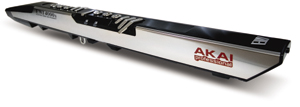
Click
Banner to buy your Akai EWI from THE Wind Controller Experts

The following article written 1/7/91 discusses the chord feature found on the EWV2000 wind controller sound module. Most, if not all, of the following article can also be applied to the later EWI sound modules that had the chord feature. We hope you enjoy the article.
Matt
PATCHMAN MUSIC
Creating Automatic Harmonies with Akai Wind Controllers
By Matt Traum @ Patchman Music - January 7th, 1991
The Akai EVI1000, EWI1000, and corresponding EWV2000 synth
module form one of the most expressive and versatile musical
instruments around. 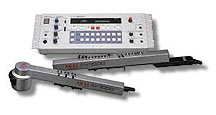 Adding
to this expressiveness is a powerful chord feature that gives
a horn player the capability to play more than one note at a
time; not simply parallel chords but completely different chords
for each note of the chromatic scale consisting of up to six
different pitches! As you might imagine, there are many unique
and powerful musical uses for this feature. This article will
attempt to clarify some of the mysteries and difficulties in
creating automatic harmony as it specifically relates to the
EVI1000 and EWI1000. Many of these ideas can be applied to the
newer wind controllers from as well. Hopefully this article will
inspire you to explore some new and creative sonic possibilities.
Adding
to this expressiveness is a powerful chord feature that gives
a horn player the capability to play more than one note at a
time; not simply parallel chords but completely different chords
for each note of the chromatic scale consisting of up to six
different pitches! As you might imagine, there are many unique
and powerful musical uses for this feature. This article will
attempt to clarify some of the mysteries and difficulties in
creating automatic harmony as it specifically relates to the
EVI1000 and EWI1000. Many of these ideas can be applied to the
newer wind controllers from as well. Hopefully this article will
inspire you to explore some new and creative sonic possibilities.
The Akai EWV2000 synth module can store a total of 16 chord qualities
or chord templates in memory. Notice I say "chord qualities"
not "chords" because you're not actually storing a
specific chord, such as C major or Db minor, but a quality such
as major, minor 7th, #5#9, etc... The quality of a chord is defined
by its intervals of deviation from the inputted or "played"
note. The assignment of these 16 chord qualities to the twelve
chromatic notes can be stored in any of the 64 EWV2000 patch
memory locations.
An EWV2000 patch can be programmed in one of three ways:
- Internal synth patch on. Chord feature off
- Chord feature on. Internal synth patch off
- Synth patch on and Chord feature on
For the rest of this article when I refer to the word "patch" I am referring to a "chord patch" as in the middle above example.
|
 Chord
Technology
Chord
TechnologyAs stated earlier, you can program the EWV2000 to transmit (via the MIDI out) one of the 16 chord templates for any note you play in the chromatic scale. Each chord template can consist of up to four notes. Any of these chord notes can be the same as the note you're playing from the EVI1000 or EWI1000 synthesizer or they can be four completely different notes within 12 half-steps from the note you are playing. As a result, you can simultaneously produce a total of six different pitches if you mix the EWV2000's two-oscillator synth engine with the 4 chord notes being transmitted to your MIDI synth module.
As you can see, this chord feature scheme allows you to easily set-up parallel or non-parallel harmonies. If you wanted that "forbidden parallel fifths sound" you could set-up a chord template that transmits the pitch you are playing as well as a pitch a fifth below [00:-07: : ] and assign it to all 12 notes of the chromatic scale.
Notice that I mention a fifth "below"- not above. There may be times that you will want to transmit notes above the notes you are playing, but generally the fingered note should be the highest sounding note when voicing chords. Please note that many of the stock chords programmed into the EWV2000 at the factory were set-up with the "played" note as the lowest sounding note. I wouldn't recommend this because if the note you are playing is not the highest sounding note it can be very difficult to hear what note you are actually playing. This is especially true with non-parallel chords. This problem is magnified by the fact that all chords are transmitted with the same velocity and breath controller values for each of the chord notes.
Parallel harmonies are useful but they are not as interesting as non-parallel harmonies. The EWV2000 takes you ahead another giant step and allows you to transmit a different interval, or set of intervals, for each note of the chromatic scale. This opens up immense possibilities as we shall see.
|
One powerful use of the chord feature might be to auto-harmonize your playing with an accompanying harmony note. In other words, whenever you play a note, the EWV2000 automatically transmits a harmony note that is in agreement with the key of the piece. For example, in the key of C major, if you play C you might transmit C and an E below it, if you play D it would transmit D and an F below it etc... But choosing the proper chords isn't as easy as it might appear and there are many things to consider before you choose a chord assignment.
Obviously, the overall key of the music is one of the crucial factors when choosing chord templates. For example, if you play a C but the music is in the key of Ab major, you might want to transmit a C and an Eb -not an E natural as you might in the key of C major.
Unfortunately, the only time you can begin to think that a chord patch will sound good throughout an entire piece of music is when the song's harmony and melody are mostly diatonic, and even then there are more things to consider. For example, every time a C appears in the melody it could be the root of a C major chord, the fifth of an F major chord, the third of an A minor chord, etc...
You should also remember that tonalities will temporarily change within a piece of music. The main reason for this is the underlying harmony. For example, suppose you are in the key of C major and a Dmaj7 chord comes up in the piece. If you played a D you might want an F# (not F natural) to be the harmony note. One way to accomplish this might be to switch to an EWV2000 patch that is set-up for the D major tonality.
Ideally you could program a chord assignment patch for each major key (C Major, C# Major, D Major etc...) and name them "C Major", "C# Major", etc... You could then switch to the appropriate patch when the tonalities in the piece change. Chances are that you would not need to change patches on every chord though, because many chords are diatonically related. For example, if you're in the key of C major, and you're playing a "C" and transmitting a "C" and an "A" you could harmonize with the following chords:
C6, Am, Am6, Am7, Am7b5, Am9, F, Fmaj7, Fmaj9, Fmaj11, D7, D7sus4, D9, D9sus4, Dm, Dm7, Dm9, Ebdim7, F#dim7, Adim7, Bbmaj9, B7b9, B7b9sus4, Cdim7, Dbmaj7#5, G9sus4, G11, etc... -in other words, any chord that contains a "C" and an "A".
|
A little pre-planning is in order here. Since you only have a total of 16 interval memories to choose from you must carefully decide which intervals are going to be the most useful. Since there is no MIDI input on the EWV2000 this makes it even more important to plan ahead since you cannot quickly change soundbanks via MIDI sys/ex dump. (By the way, the newer Akai wind controller units have a MIDI input).
In order to be able to harmonize any note in any key with one other note you will need to use a chord template for each interval quality- from a minor 2nd to a major 7th. This uses 11 memory locations leaving you with just 5 empty templates. You'll probably want to add unison and octave intervals to these as well. With these basic intervals in your EWV2000 chord memory you have the basis for harmonizing any melody with another note. The hardest part is deciding which interval to apply to a chromatic note.
Here are some starting points you might want to try:
|
To better understand the sheer number of possibilities let's look at the extremes. Suppose you wanted to cover all the possibilities and be able to harmonize your melody line with any chord in any key.
- With three notes you would need ten more interval memories for EACH chromatic note. For example, if you play a C and the first two notes are C and E. What should the third note be? Theoretically, it could be any of the ten remaining notes in the chromatic scale depending on the actual harmonic structure at that point in the piece.
- That's 12 (chromatic notes) x 11 (possible intervals) x 10 (other possible intervals) = 1,320 intervals (- duplicates) !
- If you take this to the limit and want to harmonize your lead line with any chord in any key with all four notes you would need 9 more interval memories for EACH chromatic note.
- That's 12 (chromatic notes) x 11 (possible harmony note 1 intervals) x 10 (other possible harmony note-2 intervals) x 9 (other possible harmony note-3 intervals) = 11,880 intervals (- duplicates) !
Note that this doesn't even allow for various open and closed voicings. As you can see by these examples, the 16 chord memories in the EWV2000 aren't nearly enough to cover all the possibilities. Nevertheless, the chord feature still provides very powerful musical potential for the user who is willing to learn to take advantage of it.
|
In any case, here are some ideas that you might want to try using the chord feature. I'm sure you will find many more. Note that in all cases the receiving MIDI synth must be programmed with a polyphonic patch for this to work.
- Harmonizing melodies. Turn it off for the solos.
- Harmonizing solos. Turn it on midway through solo to build excitement.
- Simulating a soli section between jazz solos.
- Playing brass stabs while the keyboardist is soloing.
- Playing four or five-voice keyboard comps while the keyboardist burns on a lead solo. Try intervals [00:-5:-10:-12] or [00:-5:-7:-10].
- Playing four-voices in unison. Set intervals to [00:00:00:00] to really thicken the sound of a synth module.
- Playing four-voices in octaves. Set intervals to [00:00:-12:+12
|
One way of avoiding all of this guesswork might be to invent a "Chord Machine" that could calculate the "correct" harmony notes from inputted data. Perhaps this data could be inputted via keyboard. Or maybe the user would program and store the chords ahead of time and then sync to a clock source. [Since this article was written new products have been introduced that do these types of things.] Then again, I suppose you could always just hire another horn player to harmonize with you...
|
Wind controllers may well be the most exciting thing to happen to horn players in years. I hope this article starts you thinking of the possibilities of using a wind controller as a harmonic device. With knowledge and properly programmed sounds a horn player can do almost anything!
Matt
Patchman Music
PATCHMAN MUSIC HOME | Wind Controller Soundbanks


 |
 Check out the INCREDIBLE PATCHMAN TURBO VL Upgrade Chip for the Yamaha VL70-m |

This page was last updated Wednesday, November 7, 2018
Copyright ©1996-2018 PATCHMAN MUSIC, LLC, All Rights Reserved
Purchase Terms and Conditions
All trademarks are property of their respective holders